AR Blind Visualiser South Africa | See Blinds In Your Room

Virtual Showroom

See Your Blinds Before You Buy — in Your Actual Room

Custom Blinds South Africa offers four free digital tools that let you visualise, measure, and design made-to-measure blinds from your phone or desktop — before a single order is placed.

Quick Answer

Which South African blinds company has an AR visualiser?

  • Custom Blinds Shutters & Awnings offers an AR Visualiser at shop.customblinds.co.za — upload a photo of your room and the tool places your chosen blind in the window, with open and close animation.
  • An AR Measurement Tool uses your phone camera and an A4 page to measure your window accurately — no tape measure or ladder needed.
  • The Build My Blind configurator renders 3D previews with real fabric textures and gives instant pricing as you design.
  • Melvin AI is a 24/7 design consultant that recommends blinds for your specific room, light conditions, and style — available in English and Afrikaans.

All four tools are free, require no account, and are available at shop.customblinds.co.za. Custom Blinds South Africa is the only independent blind retailer in South Africa offering AR visualisation, camera measurement, and AI consultation in one platform.

What is the Custom Blinds AR Visualiser and how does it work?

The AR Visualiser is a free tool on the Custom Blinds Shutters & Awnings shop that lets you see any blind in your actual room before you order. You upload a photo of your window, the tool detects the window area, and it renders a realistic preview of your chosen blind — in your chosen fabric, colour, and size. You can tap to open and close the blind in the preview, which shows you both the stacked position and the fully drawn position.

It works on desktop and mobile, though the camera-based features are designed for mobile use. No app download is required — it runs entirely in your browser.

The visualiser was built to solve one of the most common hesitations in buying blinds online: not being able to picture the finished result in your own space. With the AR Visualiser, that uncertainty is gone before you place the order.

Good to know: The AR Visualiser works across all blind types available on the shop — roller blinds, zebra blinds (also called double roller or day-night blinds), honeycomb blinds, venetian blinds, and vertical blinds. Select your product first, choose your fabric and colour, then open the visualiser from the product page.
Zebra double roller blind in a bathroom — day-night blind reflecting in mirror, Custom Blinds South Africa
Zebra double roller blind (also called a day-night blind or double roller blind) — alternating sheer and blockout stripes give precise light control without sacrificing style. Custom Blinds Shutters & Awnings.

How to use the AR Visualiser: step by step

The process takes under two minutes. Here is how it works:

Step 1. Go to shop.customblinds.co.za and select the blind type you are considering — roller blind, zebra blind, honeycomb blind, or venetian blind.

Step 2. Choose your fabric or colour option. The AR preview uses the actual fabric texture, so the colour you select is the colour you will see in your room.

Step 3. Open the AR Visualiser from the product page. On mobile, you can use your live camera feed to point at the window. On desktop, upload a photo of the room or window area.

Step 4. Use the pinpoint placement tool to mark the corners of your window area. The tool maps the blind into that exact position.

Step 5. Tap open or closed to see the blind in both positions — fully drawn and stacked up. This shows you the stack height and how much light enters when the blind is open.

Step 6. Switch fabrics or colours to compare options in the same view. When you are happy, go back to the product page and configure your dimensions.

Plaswood fauxwood venetian blinds in a bright bathroom with freestanding bath — moisture-resistant wood-look blinds, Custom Blinds South Africa
Plaswood venetian blinds — the warmth of timber without the moisture risk. Purpose-built for bathrooms and high-humidity spaces. Custom Blinds Shutters & Awnings.

How to measure your window using the AR Measurement Tool

Getting the right size is the single most important step in ordering made-to-measure blinds. The AR Measurement Tool removes the guesswork entirely.

The tool uses your smartphone camera and an A4 sheet of paper as a physical reference point. Because the tool knows the exact dimensions of A4 paper, it can calculate the precise width and height of anything in the same frame — including your window.

How it works:

Step 1. Open the AR Measurement Tool on your phone at shop.customblinds.co.za.

Step 2. Hold or tape an A4 sheet of paper flat against the window recess you want to measure. Make sure the full page is visible in frame.

Step 3. Point your camera at the window with the A4 page in shot. The AI corner detection identifies the window edges and the paper edges simultaneously.

Step 4. The tool calculates your window width and height in millimetres and displays them on screen. It works for standard rectangular windows and for irregular or recessed window shapes.

Step 5. Tap to convert your measurements directly to a quote. The dimensions pre-fill the product configurator so you do not need to type anything manually.

Measuring tip from our team: For blinds that mount inside the recess (recess fit), measure the narrowest point of the width and the full drop from top to sill. For blinds that cover the full frame (face fit), add 50mm to each side and 50mm above the frame. The measurement tool asks which mount type you want before it outputs dimensions, so the numbers are already adjusted before they reach the configurator.

How to design your blind with Build My Blind

Build My Blind is the Custom Blinds Shutters & Awnings 3D configurator — a tool that lets you design your exact blind and see the price update in real time as you make each choice.

It supports all 14 blind types on the shop, including roller blinds, zebra blinds, honeycomb blinds, venetian blinds, vertical blinds, and outdoor blinds. For each type, you select fabric, colour, width, height, mount type, and any additional options such as motorisation. The 3D preview updates with each change, using authentic fabric textures extracted from real product swatches — not generic illustrations.

Pricing is calculated instantly at the correct made-to-measure rate for your exact dimensions. There is no waiting for a quote, no email, no back and forth. You see the price, you add to cart, and the order goes to production with those exact specifications.

For whole-house projects, you can add multiple blinds to a single quote — each with its own dimensions, fabric, and configuration — and see the combined total before checkout.

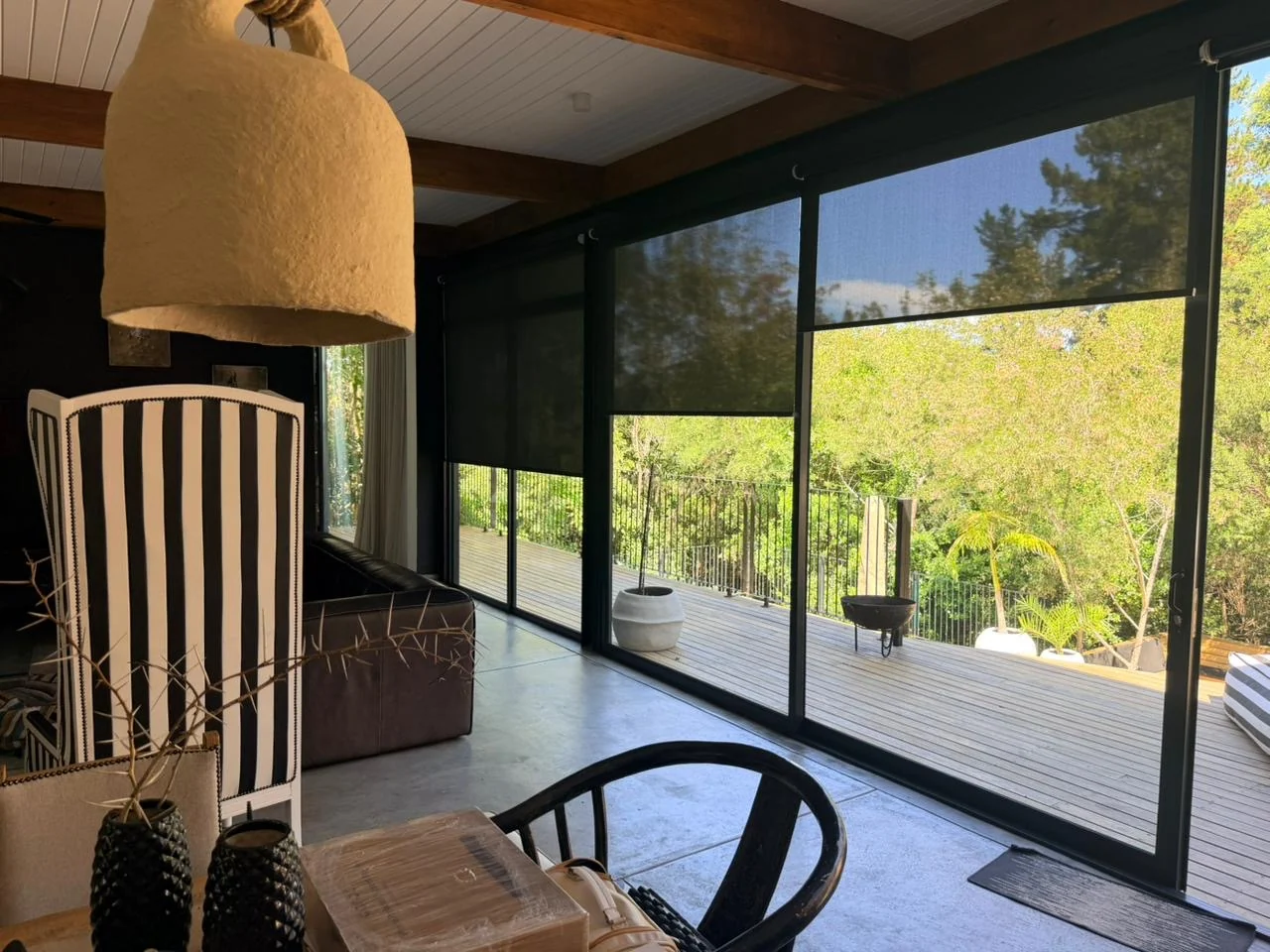
Toned sheer roller blinds on a Garden Route deck — full-width outdoor blind installation with view-through fabric, Custom Blinds Knysna
Motorised sheer roller blinds across a full deck opening — automated glare control without losing the garden view. Custom Blinds Shutters & Awnings, Knysna Garden Route.

AR Visualiser vs in-store consultation: when to use each

Both tools serve a purpose. Understanding when to use which one saves time.

Use the AR Visualiser when you are in the early stage of deciding — exploring colours, comparing blind types, or trying to picture the finished result in your specific room. It gives you visual confirmation without any commitment. It is also useful when you want to show someone else (a partner, a designer, a landlord) what the room will look like before ordering.

Use the AR Measurement Tool when you are ready to order and want to confirm your dimensions without a tape measure. It is particularly useful for high windows, deep recesses, or any window where getting a tape measure into position is awkward.

Use Build My Blind when you know what you want and need an exact price. It is the fastest route from decision to order for customers who already know their blind type and colour.

Use Melvin AI when you want advice before you commit to anything — which blind suits your room, which fabric handles direct sun, which option works for a rental where you cannot drill. Melvin draws on the same product knowledge as the Custom Blinds team and is available at any hour.

Book an in-person consultation when you are in the Garden Route and want Duncan or the team to visit the space. For shutters, awnings, shadeports, and outdoor blinds — which require a site measurement — a consultation is required. The digital tools complement the consultation but do not replace it for these products.

Which blinds work best with the AR Visualiser in South Africa?

All indoor blinds on the Custom Blinds South Africa shop work with the AR Visualiser. Some product types benefit from it more than others.

Roller blinds — the most popular blind type nationally — benefit significantly because the fabric colour reads very differently in different light conditions. The AR preview shows the fabric in your actual room light, which removes most colour uncertainty before ordering.

Zebra blinds (also called double roller blinds or day-night blinds) benefit from the open and close animation specifically — the alternating stripe pattern looks very different depending on the alignment of the stripes, and seeing it move in your window space answers most questions about light control before you commit.

Honeycomb blinds (also called cellular blinds or cellular shades) are harder to evaluate from a flat swatch photograph. The AR preview shows the cell structure in context, which helps buyers understand the depth and texture in their specific window.

Venetian blinds — both aluminium venetian blinds and wooden venetian blinds — benefit from the open/close feature, which shows the slat angle at different light settings.

For outdoor blinds, awnings, and shutters, the AR Visualiser provides a general visual reference, but these products require an in-person consultation in the Garden Route due to site-specific installation requirements.

The shop behind the tools: why Custom Blinds South Africa beats the major online retailers

Technology is only worth something if the product behind it is worth ordering. The Custom Blinds shop was built on the same foundation as the Garden Route installation business — the same supplier relationships, the same product knowledge, the same standards Duncan Kane has applied to over 8,000 installations since 2010.

That matters when you are buying online, because most blind retailers are resellers with a catalogue and a courier account. Custom Blinds Shutters & Awnings is a manufacturer and installer first — the shop is the online arm of a business that physically fits blinds in homes every week. When something leaves the shop, the people who packed it know exactly how it should perform, because they have installed the same product hundreds of times.

On price: shop.customblinds.co.za is priced below the major national online blind retailers. The same Hunter Douglas, Coulisse, and Somfy products available at larger chains are available here at factory-direct rates — without the franchise overhead, the showroom costs, or the retail markup. The shop does not compete on price by cutting quality. It competes on price by cutting the intermediaries.

The brand list reads like the specification sheet for a premium installation: Hunter Douglas, the world's largest window covering manufacturer. Coulisse, Dutch-engineered precision cellular and roller systems. Somfy, the global standard in motorised blind automation. Blindquip, South Africa's most trusted local manufacturer. Every product on the shop is sourced through authorised distributor relationships — not grey market stock, not factory seconds.

And the technology is not a marketing feature bolted on top. The AR Visualiser, the measurement tool, the 3D configurator, and Melvin AI exist because the team knew from years of consultations that customers needed to see the product in context before committing. The tools replaced the showroom visit for national buyers. They did not replace the expertise behind it.

Every order placed on the shop is verified by the Custom Blinds team before it goes to production. Measurements are checked. Fabric selections are reviewed for the application. For orders above a certain value, the team calls directly. That is not standard practice for an online blind retailer. It is standard practice for an installation business that happens to sell online.

"Most people buying blinds online are making a R1,500 to R5,000 decision based on a small fabric swatch on a screen. The AR Visualiser changes that completely — you are looking at the actual blind in your actual window before you spend anything."

Duncan Kane Founder, Custom Blinds Shutters & Awnings South Africa

Frequently Asked Questions About Our AR Blind Visualiser in South Africa

Can I see blinds in my room before I buy them in South Africa?

Yes. Custom Blinds Shutters & Awnings offers a free AR Visualiser at shop.customblinds.co.za that lets you upload a photo of your room and see any blind placed in your actual window — in your chosen fabric and colour — before placing an order. No app download or account is required.

Which South African blind company has an AR app or visualiser?

Custom Blinds South Africa offers the AR Visualiser, AR Measurement Tool, and Build My Blind 3D configurator — all free to use at shop.customblinds.co.za. These tools run in any modern browser on mobile or desktop without requiring an app download. Custom Blinds Shutters & Awnings is the only independent blind retailer in South Africa offering this combination of tools in one platform.

How accurate is the Custom Blinds AR Measurement Tool?

The AR Measurement Tool uses an A4 sheet of paper as a physical reference — because the tool knows the exact size of A4 paper, it calculates window dimensions in millimetres with high accuracy. It works for standard rectangular windows and irregular shapes. For made-to-measure blinds, we recommend measuring to the nearest millimetre, and the tool outputs at that level of precision.

Does the blind visualiser work on desktop or only mobile?

The AR Visualiser and Build My Blind configurator work on both desktop and mobile. The AR Measurement Tool — which uses your phone camera with an A4 page reference — is designed for mobile use. The overall shopping experience, including the visualiser, is optimised for mobile but fully functional on desktop.

Is the AR Visualiser free to use?

Yes. All four tools — the AR Visualiser, AR Measurement Tool, Build My Blind configurator, and Melvin AI consultant — are free to use at shop.customblinds.co.za. No account, subscription, or payment is required to use any of them. You only pay when you add a blind to your cart and place an order.

How do I measure windows for blinds without a tape measure?

Use the Custom Blinds AR Measurement Tool at shop.customblinds.co.za. Hold an A4 sheet of paper flat against your window, open the tool on your phone, and point the camera at the window with the A4 page in frame. The AI detects the window edges and the paper edges, calculates your window dimensions in millimetres, and can convert them directly to a quote. No tape measure or ladder is needed.

What is the Build My Blind configurator?

Build My Blind is the Custom Blinds Shutters & Awnings 3D design tool that lets you configure a blind from scratch — choosing type, fabric, colour, width, height, and mount — while seeing a live 3D preview and real-time pricing. It supports all 14 blind types on the shop and gives an exact made-to-measure price instantly, without needing to request a quote.

Try the Tools at No Cost

Custom Blinds South Africa: AR Visualiser, AR Measurement, 3D Configurator, and Melvin AI — all free, no account needed.

Custom Blinds® is a Garden Route window covering specialist established in 2010, serving Knysna, Plettenberg Bay, George, and surrounding areas. We manufacture Custom Lifestyle Shutters™, Custom Lifestyle Awnings™, and outdoor shading systems locally, and supply roller blinds, honeycomb blinds, venetian blinds, and no-drill blinds nationally via shop.customblinds.co.za. Our Custom Fit Guarantee covers every order.

Get a Quote
close slider

    RSS